How to set up Ragnar navigation menus with Divi theme builder
Who is this article for
- Anyone who owns the Ragnar and needs help setting up navigation menus.
Skill level:Easy
Time to complete: **2+ minutes
Before you start
-
Please make sure you have the latest Divi Theme installed and Divi Den Pro is up to date.
-
Make sure that Divi Den Pro plugin API key is activated.
Video Tutorial
How to do it
Open Divi Den Pro dashboard by clicking on its icon:

Under the Layout Finder tab, find the navigation you would like to use and download it by clicking the downloadbutton:
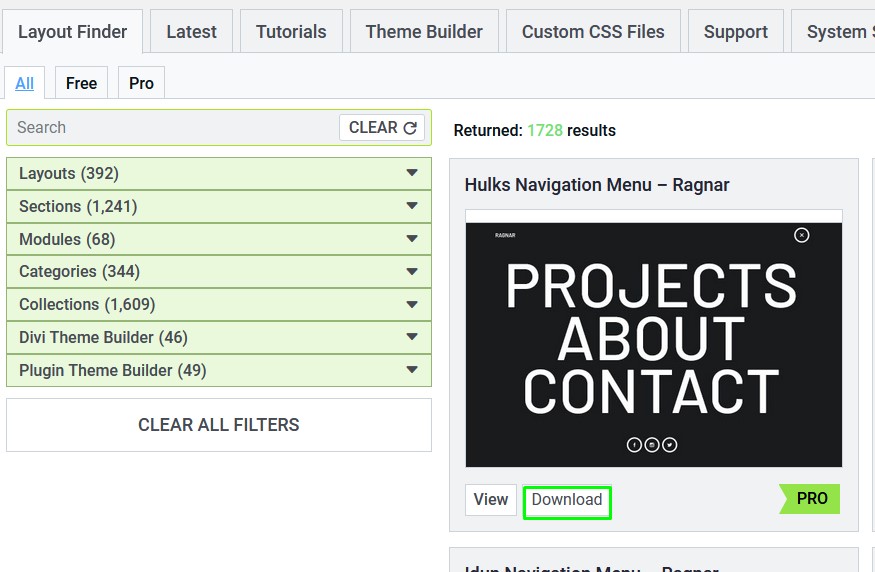
That will store the navigation's JSON file to your computer.
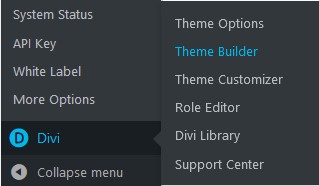
Now it's time to import the layout. Go to Divi> Theme Builder:
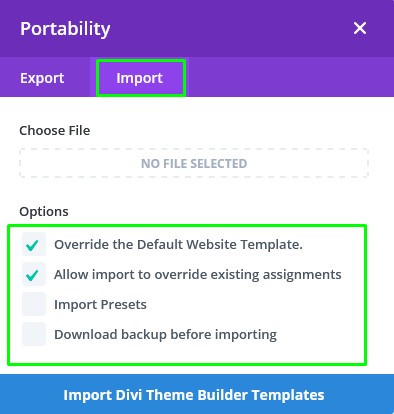
Click the portabilityicon:

Select the Importtab. Before uploading your file, ** pay attention not to override your existing Theme Builder templates.
Finally, assign your navigation to pages where you want to show it. To show it on all pages across your website, drag & drop the navigation in the default website template.
After doing so, delete the unassigned template.
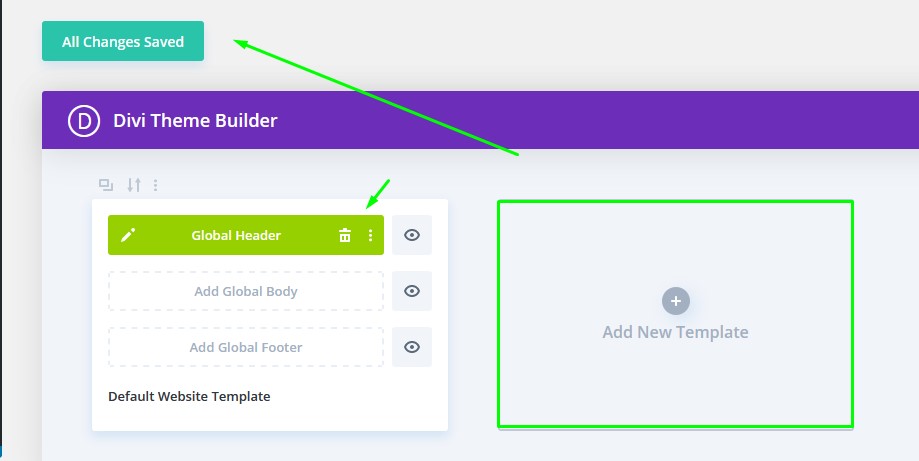
Finally, click the Save changes button in the top left corner, and you are all done.