How to create a custom Pop-Up template
Who is this article for?
Anyone who owns Divi Den Pro and wants to know how to create a custom Pop-Up template.
*See how to create other templates here: *Create your own custom Divi Theme templates
- Skill level: Easy• Time to complete:**5+ minutes
Video Tutorial
Creating the template
**1.Go toPages>Add New to create a new page:
 Add your content by using the back-end or the front-end Divi builder.
You can add any content you would like.
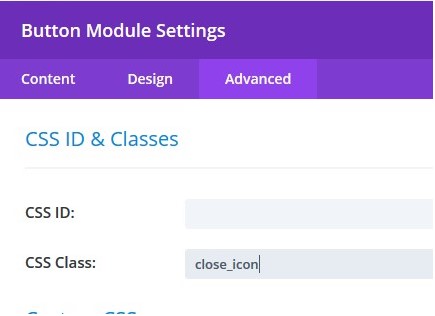
- 2. *Allow your visitors to close the pop-up by clicking the close button. To do this, create a button module, go to settings, select Advanced tab, and add this class: close_icon
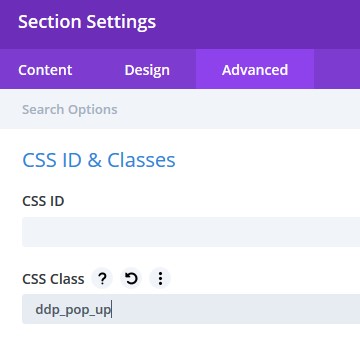
 3. Assign a class to the whole section. Go to section Settings > Advanced tab > CSS ID & Classes.
For the CSS class, type: ddp_pop_up
3. Assign a class to the whole section. Go to section Settings > Advanced tab > CSS ID & Classes.
For the CSS class, type: ddp_pop_up
 4. Add style
To add the background to the pop-up, do that in the row settings.
4. Add style
To add the background to the pop-up, do that in the row settings.
To add an overlay, assign the background colour to the entire section.5. Save the layout and assign it to two categories: PHP TemplateandPop-Up 6. Go toDivi Den Pro**>Theme Builder>WordPress Customizer.
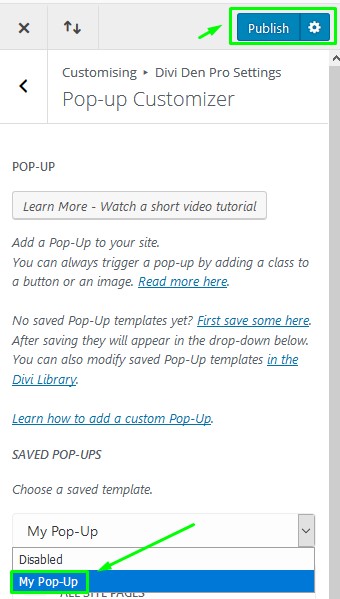
ToggleDivi Den Pro, then togglePop-up Customizer**.
From the drop-down menu, choose the pop-up template you just created.
Select the option to show the pop-up on all site pages:
 And finally, click the** Publishbutton.
 Optional: Trigger pop-up on click
You can also display the pop-up only when a visitor clicks a button.
Optional: Trigger pop-up on click
You can also display the pop-up only when a visitor clicks a button.
To trigger the pop-up on the click event, add the class: ddp_pop_up_trigger for the element that is clicked (button).