How to set up and change a premade Single Blog Post Template with the Plugin Theme Builder
Who is this article for?
Anyone who owns Divi Den Pro and wants to know how to set up a custom Single Blog Post PHP template.
NOTE: Since Divi 4.0 it is possible to use the Divi Theme Builder for this. See the instructions at the bottom of this article.• Skill level:Easy• Time to complete:**5+ minutes
Video Tutorial
How to do it
Go to Divi Den Pro dashboard and select the Theme Builder tab. Then select the Plugin Theme Builder tab.
Save the layout you like and then go toAppearance> Customize.
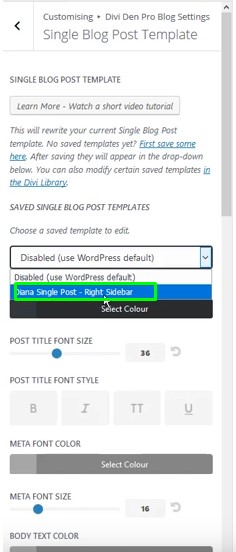
ToggleDivi Den Pro Blog Settings>Single Blog Post Template.
From the dropdown menu, select the template that you have just saved to the library:
 Customizing
This is a PHP template and it's not possible to use the Divi Page builder to customize it. However, you can change the looks of this template by using the built-in design options within the Customizer.