How to customise the Divi Mobile Menu
Who is this article for
Anyone who owns Divi Den Pro and would like to know how to customise the default Divi mobile menu. • Skill level: Easy - **
Time to complete**: 10+ min
Video tutorial
Before we start
-
Make sure to have the Divi theme and the Divi Den Pro plugin up to date.
-
Mobile menu works only if the custom main menu is disabled.
How to do it
Go to Divi Den Pro dashboard:

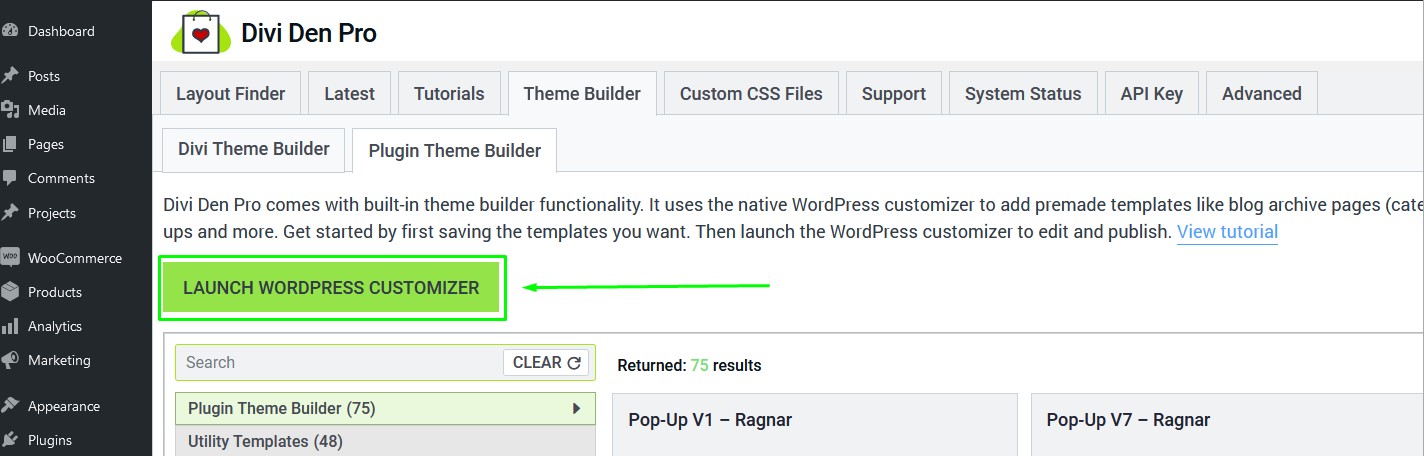
Go to Divi Den Pro dashboard and select the Theme Builder tab. Then select the Plugin Theme Builder tab and launch the customizer:
Select Divi Den Pro Global Settings:
 Toggle Global Mobile Menu:
 From the dropdown list, choose the menu you'd like to use on your website, and hit the Publish button:

Divi Default Mobile Menu - Default mobile menu of the Divi theme.Custom Divi Mobile Menu - Default Divi mobile menu, with customization options.Tab Mobile Menu, Click Mobile Menu, Info Mobile menu - Premade mobile menus.
Customization
Each menu can be fully customized. You can change all colours and fonts. You can choose to display the mobile menu even on desktop, or set a breakpoint.
Some additional options may appear, depending on the menu you've selected.
